


Fetch is the modern way of handling HTTP requests in JavaScript. It returns a Promise, so it is compatible with async/await architecture, and stays away from getting into the callback hell of XMLHttpRequest. Fetch is natively supported by most browsers, but we know, Internet Explorer is always 10 steps behind.
As of writing this article, the browser support for fetch is as follows:
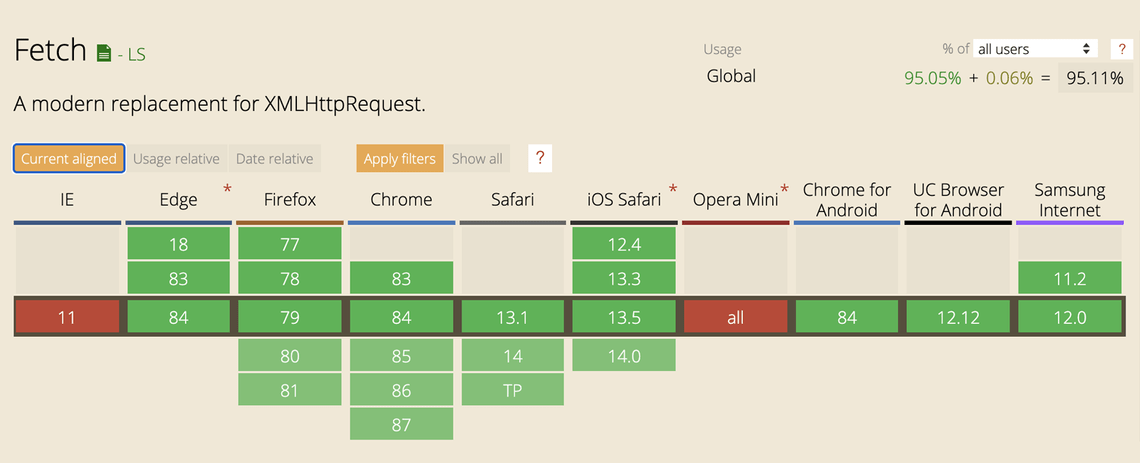
To add support for fetch, we will use whatwg-fetch, which is an implementation of fetch by Github using XMLHttpRequest. To install them, execute the following command:
If you use npm, do npm install instead of yarn add
Now, there are two ways you can make this work.
Directly importing it
You can directly import the fetch to any file and it will be add its own implementation if the native implementation does not exist.
If you’re using webpack
The benefit of using webpack is that you don’t need to import it anywhere. We will need another library import it to our code.
Assuming we already have webpack setup, navigate to the webpack config file and add the following plugin into the config.
The whatwg-fetch library only adds its own implementation to the window when fetch does not exist natively, so other browsers like Chrome and Firefox would still rely on the native implementation of fetch.
That is all what we need to do, and we should be good to go in support of the legacy browsers!
Related Posts

Quick Links
Legal Stuff